
Modify Take Profit MT5: The Profit-Saving Trick Most Ignore
Most traders place a take profit and walk away. Few learn how to modify take profit on MT5 in a smart and simple way. This small step changes how you protect gains. It also shapes how much you keep when the market turns. A take profit is more than a target. It is a safety tool. It is a plan. It is a way to lock profit before price pulls back.
Before we go deeper, note this. When you trade with Dominion Options, each change to your take profit hits the market with speed. You get raw spreads, fast order fills, and clean chart data. This helps when you modify levels in real time. A small tool works better when the platform supports it.
Many traders skip this tool because they think a take profit should stay fixed. But the market moves in waves. Zones form. Volume shifts. Trends slow down. When this happens, knowing how to modify take profit MetaTrader 5 is a skill that saves money.
This guide explains why the modify feature matters, how it works, when to use it, what to avoid, and how it fits into your full trade plan. By the end, you will know why this is the most ignored profit-saving trick in MT5.
What Take Profit Does in MT5
A take profit closes your trade once price hits your target. It frees you from watching the chart all day. It also keeps emotion out of the exit. Many traders learn how to set stop loss & take profit on MT5 but never learn what to do after the trade is live.
A take profit is not a rigid line. It is your plan for the best outcome. But plans change when the chart changes. A fixed target may not match new market structure. This is why you must learn to modify and profit on MT5 without fear.
A target should serve you, not trap you. If the market gives you a better exit, take it. If the market weakens before your target, adjust it. That is smart trade management.
Why You Should Modify Take Profit on MT5
Many traders lose profit because they refuse to adjust. Here are the clear signs that you should modify take profit on MT5.
Why You Should Modify Take Profit on MT5
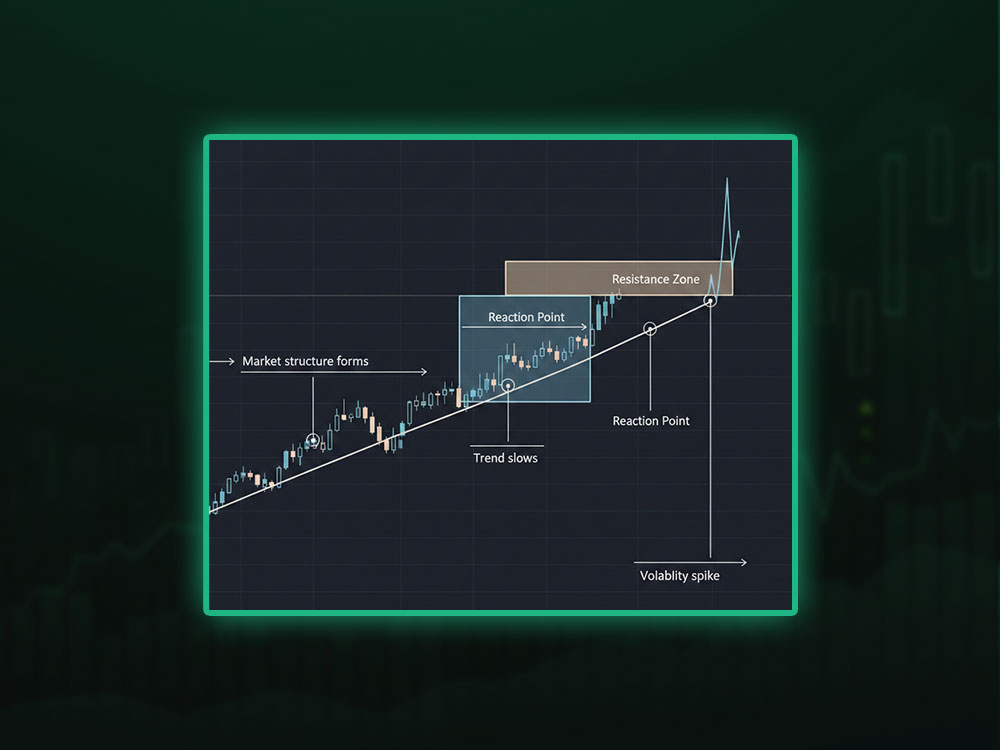
1. Market structure forms before your target
A strong support or resistance appears before the original target. These zones often match patterns explained in forex technical analysis guide. When price pauses or rejects that area more than once, it shows the level has strength. If the market respects that zone and slows down near it, taking profit a bit early is often the safer choice.
2. Trend slows down
A trend can run strong early, then lose power. Slow candles, small bodies, and long wicks show a weak push. Patterns like these often appear in forex chart patterns that signal early weakness. Adjusting your take profit helps protect the move.
3. Volatility rises fast
News events cause sharp spikes. Using the right tools and MetaTrader 5 indicators can help you see momentum shifts before they hit your TP. These spikes often fade. Lowering your TP a bit can save a strong trade.
4. You want partial exits
Some traders want to take profit at more than one level. Changing your TP helps manage that plan.
5. You want to reduce risk as the trade grows
A winning trade can pull back suddenly. A simple TP update helps you lock in a safe gain.
Knowing how to modify take profit MetaTrader 5 is about timing. You adjust when the chart gives you real clues, not because you feel fear.
How to Modify Take Profit on MT5 Step-by-Step
Here are the best ways to adjust your TP in MT5. These steps also help if you are learning how to set stop loss & take profit on MT5 for the first time.
Modify through the Trade Window
- Open MT5.
- Go to the Toolbox.
- Select the Trade tab.
- Double-click your open order.
- Look for the Take Profit field.
- Enter your new level.
- Click Modify.
This method is exact and works well when you need a precise number. If you are new to the platform, reading how to use MetaTrader 5 can help you understand the trade window layout faster.

How to Modify Take Profit on MT5 Step-by-Step
Modify by right-click
- Right-click on the open order in the Trade tab.
- Select Modify or Delete.
- Enter a new take profit level.
- Click Modify.
This is one of the fastest ways to modify take profit on MT5.

Modify by right-click
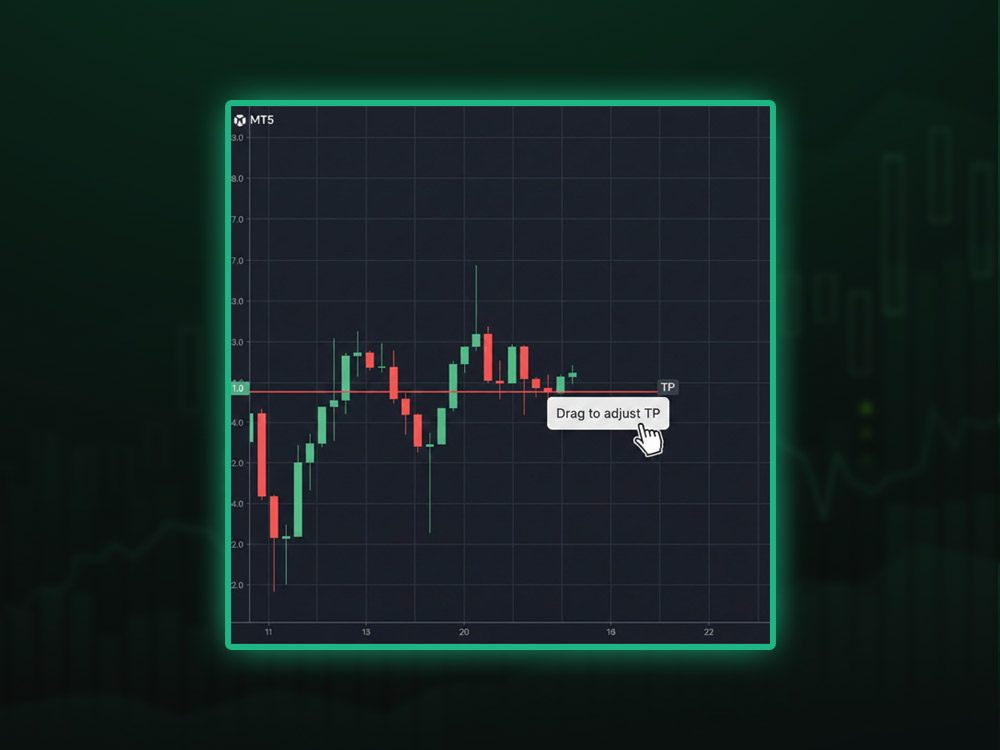
Drag the line on the chart
This method helps visual traders who rely on zones. You can combine this with lessons from our guide about what is MetaTrader 5 to understand chart tools better.
- Check that trade levels are visible on your chart.
- Find the red take profit line.
- Click the line.
- Drag it to the new level.
- Release and confirm.
Drag the line on the chart
When you drag the line, MT5 updates the order right away. Traders who trade support and resistance love this tool. It makes it easier to modify and take profit on MetaTrader 5.
Use one-click tools
If you turn on one-click trading, you can adjust fast. This helps when the market moves quickly.
When to Modify Take Profit on MetaTrader5
Not every moment is ideal. Here are the best times to change your target.
1. When price reaches a reaction zone
If price hits a known level and rejects it, adjust your TP before a deeper pullback. Reaction zones often tie into the risk to reward ratio in forex, so adjust with that balance in mind.
2. When you see a strong wick
Long wicks show rejection. If the wick forms near your target, exit early with a TP change.
3. When trend lines break
Breaking a trend line often shows a shift in momentum. You can secure profit by modifying your TP sooner.
4. Before high impact news
When news hits, spreads widen. Moves become wild. Traders who know how to modify take profit MetaTrader 5 can lock in gains before the chaos starts.
5. When risk-reward is already met
If you already reached a 2:1 or 3:1 reward, securing the trade makes sense.
When You Should NOT Modify Take Profit on MetaTrader5
A wise trader knows when to adjust and when to wait.
1. When you act from fear
If the chart still supports your idea, leave your TP alone.
2. When the setup is strong
If the trend shows strength, allow the price to reach your target.
3. When you want to “grab something” too soon
Do not cut winners too early. A good target can produce better long-term results.
4. When you want to push your TP farther
Stretching your target may break your plan. Stay disciplined.
How to Choose the New Take Profit Level
This section helps you pick strong levels when you modify take profit on MT5.
1. Look left on the chart
Zones that held before often hold again.
2. Use round numbers
These levels attract orders. They act as natural turning points.
3. Use swing highs and swing lows
These points show where price has turned before.
4. Use ATR
ATR helps you measure average movement. It helps avoid unrealistic targets.
5. Combine signals
If a level matches a round number and a swing high, it becomes a strong take profit area.
Trailing Stop + Take Profit Modification
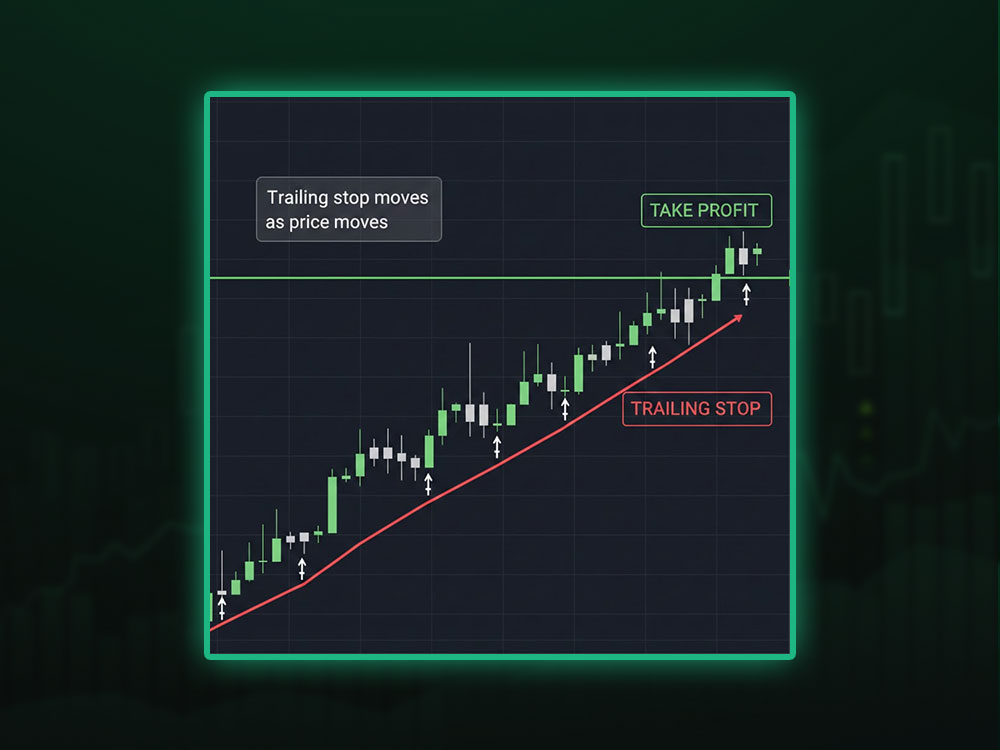
Trailing stop helps lock profit as the market moves your way. When you know how to set stop loss & take profit on MT5, trailing stop becomes your next upgrade.
A trailing stop keeps adjusting your stop loss. Pair this with a modified TP and you get a balanced exit plan.
For example:
- Modify TP to a safe target.
- Add a trailing stop to follow the move.
- Let the market run if it wants.
- Protect gains if it reverses.
This blend works well for trend trades.
Common Mistakes Traders Make
Common Mistakes Traders Make
Avoid these issues when you modify take profit MT5. These mistakes often show up when traders skip the basics of trading on MT5 or entry rules in buy stop vs buy limit guides.
Adjusting too late
Changes should happen when price gives hints, not after a reversal.
Adjusting too often
You do not need to change your target every few minutes.
Using a target that is too tight
Tight TPs often get hit by random noise.
Ignoring volatility
Different markets need different TP sizes.
Adjusting TP without using a stop loss
A stop loss should always be paired with a take profit. This is the foundation of how to set stop loss & take profit on MT5.
Mindset Behind Smart Adjustments
You want to act based on logic, not emotion. The goal is to protect gains, not chase dreams. When you trade with a calm mind, you see the chart clearly. This helps you choose when to modify TP without overthinking.
Your mindset should sound like this:
- “I protect strong trades.”
- “I adjust when the market gives signs.”
- “I let winners run when the move is clear.”
- “I do not change TP because I feel fear.”
This is how professional traders handle exits.
Why Most Traders Ignore This Feature
Most traders never learn how to modify take profit MetaTrader 5 for simple reasons:
- They think TP must stay fixed.
- They do not know the tool exists.
- They worry about making mistakes.
- They do not track their exits.
- They think only stop losses matter.
But strong exits shape long-term growth. A good exit often matters more than the entry.
A Simple Routine You Can Use Daily
Here is a clean routine for trade management:
Step 1: Watch the first move after entry.
Step 2: Identify zones ahead.
Step 3: Look at candle speed and wick shape.
Step 4: Decide if momentum is strong or weak.
Step 5: Modify TP only when the chart supports it.
This routine builds discipline.
The Real Power Behind Take Profit Modification
The core skill is awareness. You follow the market, not your hope. You learn where price hesitates. You learn where moves fade. When you master this skill, your exits become sharp.
Traders who adjust wisely keep more profit. They protect themselves from traps. They grow faster. The modify feature in MT5 becomes a profit tool, not just a button.
Final Thoughts
Most traders ignore the modify feature. They miss the chance to secure stronger gains. Knowing how to modify take profit on MetaTrader 5 helps you protect profit, adapt to the chart, and exit with more control. MT5 gives you the tools. Your job is to use them at the right time.
With a top forex broker such as Dominion Options, these actions become smoother. You get raw spreads, fast fills, deep liquidity, and clean order flow. These features make every take profit change more reliable. When you pair skill with strong conditions, your results improve.
Modify your take profit with purpose. Protect your profits. Use every tool MT5 gives you. Most traders skip this step. Now you know better.
FAQs: Modify Take Profit MT5
1. How do I modify take profit MT5 quickly?
Use the chart drag tool. Grab the red line and move it to the new level.
2. What is the best way to learn how to modify take profit MetaTrader 5?
Start with the Trade window. It is clean and simple.
3. Does modifying take profit change execution speed?
Your broker matters. With Dominion Options, execution stays fast and stable.
4. Should I modify TP before news?
Yes. Price can swing hard during news. Securing profit is often wise.
5. Is it safe to move TP farther away?
Only if the setup improves. Do not change targets just to chase a bigger win.
5. Where does how to set stop loss & take profit MT5 fit into this?
It is the base skill. Once you know how to place both levels, modification becomes easier.