How to Use a Forex Simulator to Practice Without Risk
Trading forex without practice is like driving a car without lessons. You might get lucky, but chances are you'll crash. That’s why a forex simulator is so useful. A forex simulator lets you practice trading with fake money but real market data. No risk. No stress. Just solid practice. You get to trade, mess up, fix it, and learn—all without losing a dime.
This article shows how to use a forex simulator to test your strategies and sharpen your skills. It covers what a forex simulator is, what to look for, and how to use it the right way. That means using it like you would the real thing. Not just opening trades for fun. Not just clicking to see what happens. The goal is to train your brain and your habits. Treat each session like it matters. Practice how you'll play when money's on the line.
Platforms like Dominion Options work well with MT5 Simulator setups, so you can move from practice to live trading with the same strategy and tools. No need to learn a new system—what you use to practice is what you use to trade.
What Is a Forex Simulator?
What Is a Forex Simulator?
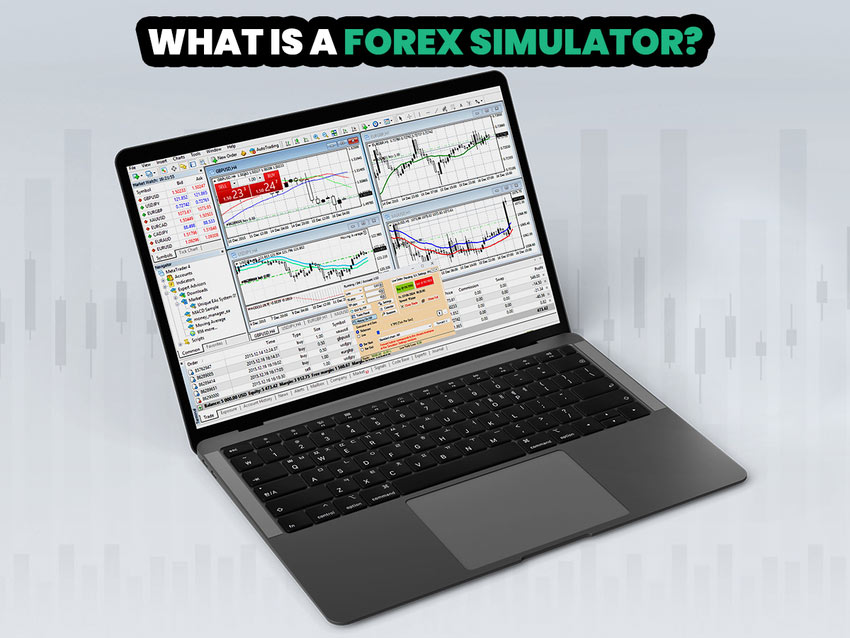
A forex simulator is a tool that lets you trade using past market data. You open and close trades just like in a real account. But you use virtual money, so you don't lose anything. For example you try a breakout strategy. You see a setup, enter the trade, and it fails. You lose fake money. No harm done. You rewind, review what went wrong, and try again. That’s how you learn without fear.
Try trading gold instead of currency. Open a chart of XAU/USD during a volatile time, like around U.S. job data. Place a buy after a dip, thinking gold will bounce. But it keeps dropping. You lose fake money. So you pause, rewind, and ask yourself why. Was your entry too early? Did you ignore a key trend line? Now you’ve got real insight—without the pain of a real loss.
Want to try this with gold? Check out our article on how to trade XAU/USD for step-by-step guidance.
Most forex simulators use data from platforms like MetaTrader 4 (MT4) or MetaTrader 5 (MT5). Some forex simulators are stand-alone apps. Others run as add-ons to trading platforms.
If you're deciding between them, our guide on MetaTrader 4 vs 5 breaks down which platform pairs best with your simulator setup.

Forex Simulator
You control when to start the forex simulation, how fast it runs, and which currency pairs to use. You can pause, rewind, or jump ahead.
Let’s say the market starts moving too fast for you. You can slow things down and look closer at what happened. Or if you want to skip a slow part, jump forward to the next big move. You’re in control, like watching a show on your own time. This helps you focus on key setups without wasting hours.
Why Use a Forex Simulator?

Why Use a Forex Simulator?
- No risk: You don’t lose real money. You can make mistakes, test wild ideas, or just explore. Try shorting GBP/USD during a major news release. If you're wrong, it's no big deal. You learn from the loss without it touching your wallet.
- Learn faster: You can test days of trades in just an hour. For example, load EUR/USD data from a busy week. Set the forex simulator to 5x speed. In one hour, you can walk through what happened during a full week. You'll spot setups, enter and exit trades, and see how your plan holds up in different conditions. What would take you five days in real time, you can do in a lunch break.
- Try strategies: Test ideas without fear of losses. Maybe you read about trading pullbacks in a trend. Fire up your forex simulator, find a strong uptrend on USD/JPY, and look for a dip. Enter when it pulls back to a moving average. If it works, great. If not, figure out why. Was the trend weak? Did you jump in too soon? You can test and tweak without stress.
- Build confidence: See how your plan works before going live. Say you backtest a scalping strategy on GBP/USD. After 50 trades, you see a solid win rate. You’re no longer guessing. You know your setup. You’ve seen it win and fail. Now, when you move to a live account, you're not shaky. You've done the reps.
A forex simulator also helps you get used to your trading platform. You learn where buttons are and how to set trades without pressure. If you trade with Dominion Options, using the MT5 Simulator helps you prepare more accurately. The tight spreads and high leverage mean what you test in simulation often matches how trades will play out live.
Top Features to Look For in a Forex Simulator
Not all forex simulators are the same. Good ones give you:
- Real market data with tick-by-tick moves.
- Realistic spreads, slippage, and commission.
- Tools like charts, indicators, and drawing tools.
- The option to trade more than one currency at once.
- The ability to speed up or slow down time.
- Reports to track your results.
Some, like the MT5 Simulator, even let you use custom timeframes, step-by-step playback, and drag-and-drop trading, all within the MT5 Simulator. You can easily replay past market action, pause to analyze setups, and place trades right on the chart. It works just like live trading, so you build muscle memory while learning.
Getting Started with a Forex Simulator
You don’t need a lot to start. Here’s what to do:
- Pick a forex simulator. MT4 and MT5 have built-in simulators. You can also try apps like Forex Simulator or the Supreme Edition of MetaTrader.
- Download and install. Follow the steps on the forex simulator’s website. Most take only a few minutes.
- Get data. Good forex simulators offer historical data going back many years. Pick a time period you want to trade.
- Set up your account. Choose a balance close to what you might use in real trading.
- Start trading. Place trades, adjust stop losses, take profits, and watch how things play out.
How to Practice the Right Way

How to Practice the Right Way
A forex simulator won’t help much if you just click random buttons. Follow these tips:
- Use a real strategy. Don’t guess. Use a plan and stick to it.
- Track results. Write down your trades. Look for patterns.
- Practice one idea at a time. Don't mix things up too much. Focus.
- Trade like it's real money. This builds better habits.
- Review mistakes. Use the rewind tool to see what went wrong.
- Test many conditions. Try different times of day, news events, and markets.
- If you want to improve faster, build your sessions around solid forex technical analysis so you’re reading trends, levels, and structure the right way.
Example Session
Let’s say you want to test a trend-following strategy. Here’s a sample session:
- Pick EUR/USD on a 1-hour chart.
- Use the moving average crossover method.
- Set up forex indicators and start from a day in 2025.
- Play through the chart at 4x speed.
- Enter trades when the short MA crosses the long MA.
- Exit when it crosses back.
- Note win/loss and adjust settings if needed.
This helps you learn when the method works and when it doesn’t using a forex simulator.
Paying attention to recurring price behavior, like common forex chart patterns, makes simulator practice far more effective and realistic.
Mistakes to Avoid
- Over-speeding: Don’t go too fast. You’ll miss details.
- Changing plans too often: Stick with one method per session.
- Ignoring trade size: Use proper risk management.
- Skipping review: Always check your trades.
- Getting too confident: Forex simulators don’t trigger real emotions. Stay humble.
Final Thoughts
A forex simulator is the best way to practice trading without losing money. It’s safe, smart, and helps you learn fast.
Use a forex simulator with purpose. Pick a plan, test it, track your trades, and grow your skills. That way, when it’s time to trade for real, you’ll be ready. This same MT5 Simulator setup works great with live trading on brokers like Dominion Options. Their tight spreads and high leverage help ensure your practice results closely match real-world performance.