Mastering Trading and Orders on Metatrader 5: the Ultimate Guide for Beginners and Pros
The MetaTrader 5 is an award-winning, modern multi-asset platform that caters to both beginners and experts. It is an upgrade on the MetaTrader 4 platform and is loved by a majority of traders. Dominion Options gives its client access to MetaTrader 5 as an option for trading. This article will take a deep dive into trading and order execution on MetaTrader 5.
When you start your journey on this platform, the first and most crucial step is learning how to place orders. This will determine how well you execute your trades, manage risk and implement your strategy. Therefore, it determines your performance as a trader.
Getting Started With Mt5

Getting MT5
The first step is to install the MT5 platform on your desktop. To do this, go to the Dominion Options website and click on register. After filling in the details, you will get login credentials for MT5. Go to the platforms option and click on MetaTrader 5. This will give you the installers, which you can run on your computer and download the MT5 platform.
The Available Order Types
There are different types of orders on MetaTrader 5 including market, pending, stop and trailing stop orders.

MT5 order types
Market Order
A market order is the most commonly used by traders. It executes a trade at the current market price. Therefore, it is best used when you have already found a great trading opportunity and want to enter a trade immediately. Additionally, if you are the type to keep monitoring the charts for trading opportunities, you can use market orders once all the conditions of your strategy are met.
Pending Order
On the other hand, a pending order anticipates price movement in future. Therefore, you can place it above or below the current price. There are different types of pending orders.
- A Buy Limit is a buy order placed below the current price. Therefore, a long position is triggered when the price continues to drop. This order can be great for anticipating a bullish reversal.
- A Buy Stop places a buy order above the current price. In this case, if the price continues climbing, it will stop and trigger a long position. Traders who trade bullish continuation patterns can use this order.
- A Sell Limit places a sell order above the current price. This order is good for traders anticipating a bearish reversal.
- A Sell Stop places a sell order below the current price. Therefore, it is great for bearish continuation patterns.
Stop Order
A stop order is a risk management tool that places a trade above or below the current price to limit losses or protect profits. Therefore, if you are in a long position, you can place a Sell Stop order, better known as a stop loss order below the current price. This will cancel out your position, allowing you to exit with a calculated loss or profit.
Trailing Stop Order
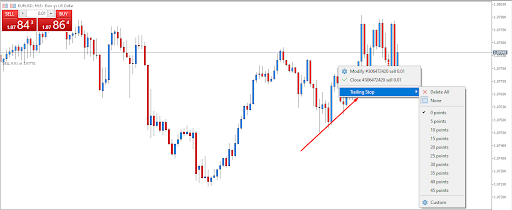
Trailing stop loss
How to Enter, Modify and Exit Trades
After learning all the available order types on MT5, you can move to the next step which is trading.
Entering
On the platform, you can enter trades on the chart you are analysing or above the chart, on the tools window.

Entering
After clicking on either of these two options, you will see a smaller window giving you parameters to fill in before placing your order. The first section shows you the symbol you are trading. You can change this if you want to place an order for a different instrument.
After that, you can decide whether it will be a market or pending order. A market order will be executed immediately. Meanwhile, a pending order will come in the future, above or below the current price.
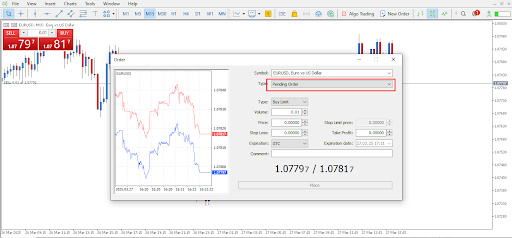
Pending order
After that, you must choose the size of your position. The volume is displayed in lots and will determine how big your trade is. Finally, you can place a price for the stop loss order or the take profit order. If you are not sure of the prices, you can manually place them on the chart after entering a position. The comment section can remain blank, though you can add a comment if you like. For the pending order, you can add an expiration date after which the order will be cancelled. After filling in all the necessary sections, you can place the order.
Modifying

Modifying/closing orders
After entering a trade, you have an option to modify the order. You can do this directly on the chart or the trade window below the charts. Right-click on the trade to get the option to modify. Here, you can change or add a stop loss and take profit.
Exiting
You can also exit the trade in the same way you modify it. Right-click on the trade to get an option to close. You can also click on the x on the trade window to exit a trade.
Advanced Features
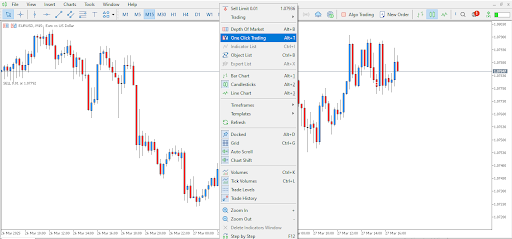
One-click trading
Some advanced features you might meet while placing orders on MT5 include one-click trading and hedging. One-click trading is suitable for short-term traders as it reduces delays when entering a trade. You can place your trades with a single click. Therefore, there is no need to confirm. To set this feature, right-click on the chart.
Additionally, with MetaTrader 5, traders can use hedging strategies. This is where you place two opposite trades to reduce your potential losses. Moreover, you can use Expert Advisors or EAs which are robots that can automate most of your trading.
How to Succeed in Trading on Mt5
Although it is important to master trading and order placement, there are other things that make a successful trader. These include having and sticking to a profitable strategy, testing your strategy in a demo account and using prop risk management to protect your capital.
After creating or finding a good strategy, it is important to test it with a demo account before applying it to the live markets. This will give you a chance to build confidence and discipline.
Meanwhile, the MetaTrader 5 platform gives you the tools for risk management like stop loss orders and trailing stop loss orders. Proper risk management will ensure you survive through storms like a losing streak.
Finally, you must keep learning to improve your skills and keep up to date with the latest developments in the trading industry. To do this, you can get a wide range of articles on Dominion Options that will keep you properly informed.
Join Dominion Options today and experience trading on MetaTrader 5. Join other traders in using the multi-asset award-winning platform.