A Complete Guide to Trading Stocks and Indices on MT5
Trading stocks and indices is made so much easier with the multi-asset MetaTrader platform. Whether you only focus on stocks or are a multi-asset trader, this article will show you how to do all this with Dominion Options on MT5.
Today, traders can trade stocks as CFDs on the MetaTrader platform. This means taking part in price movements without actually owning the stock or buying shares. You can access many other platforms for trading stocks and indices. However, MT5 stands out because of its superior design, which allows both beginners and experts to feel at home. Navigating the interface on the MT5 platform is easy.
Moreover, MetaTrader has designed the platform to give you a robust trading experience. It has a wide range of tools, indicators, and robots that allow traders to use any strategy they choose. That is why it is one of the most popular platforms.
Benefits of Using Mt5 for Trading Stocks and Indices
There are many reasons why many traders are choosing to work with the MetaTrader 5 platform. It comes with powerful features that give traders an edge over the competition.
- Fast execution speeds will allow you to perform better while scalping.
- A wide range of charting tools, such as 38 built-in indicators, gives you a wider angle from which to analyze the markets.
- Access to 21 timeframes means you can better analyze stocks and indices.
- Fundamental analysis tools like an inbuilt calendar will ensure you stay current on news and earnings.
- Multiple order types allow traders to place trades above or below current market prices.
These are just some of the advantages of using MT5 over other platforms.
How to Start Trading Stocks and Indices on MT5
The first step to starting your journey on MT5 is to set up your Dominion Options trading account. You can do this by heading to the Dominion Options website and clicking on the register button. This will direct you to enter your account details.

Dominion Options Registration
After setting up your account and depositing funds, you can download the MT5 platform from the Platforms section and install it on your computer.
How to Analyse Stocks and Indices on MT5
Opening up the MT5 platform will give you access to fundamental and technical analysis tools, which can be very useful depending on your strategy.
Fundamental Analysisl
Fundamental analysis involves monitoring financial statements, economic releases, political changes, and industry trends to determine future price movements. MetaTrader 5 supports fundamental analysis with in-built features like the calendar. Here, you can keep monitoring important news releases that might impact the stocks and indices in your portfolio.

MT5 calendar
The MetaTrader 5 platform comes with an inbuilt economic calendar. It allows traders to monitor and analyze incoming economic reports that might impact prices. Furthermore, you can customize the calendar to show only specific reports. You can also add these major events to the charts so that you can see all the upcoming releases.
News feature
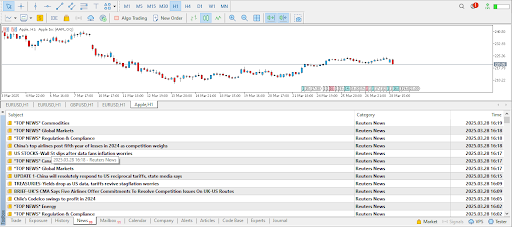
Additionally, MT5 has a news feature that covers events on stocks and indices. Moreover, traders can stay current on top news from sources like Reuters without constantly checking their websites. Therefore, traders can place orders while monitoring major reports and news releases on the same platform.
Technical Analysis
The MetaTrader 5 platform excels at technical analysis due to its wide range of tools and indicators. At the same time, it has several types of charts, like candlesticks, which most traders prefer for technical analysis. You can customize these charts by changing colors and creating templates according to your preference or style of trading. You can access some trading tools on the top bar or by going to the insert option.

Fib tool
An example of a simple tool is the Fibonacci. You can quickly press on the Fib tool and draw it on the charts to see potential support and resistance levels. You can use other simple tools like rectangles to better mark these support and resistance levels.
Indicators list
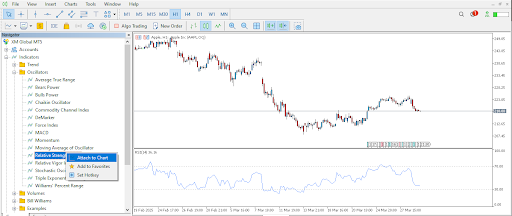
Moreover, you can open the navigator for more complex tools and indicators. Here, you will find a wide range of indicators, such as moving averages for trend traders and the RSI, to identify overbought and oversold levels. These indicators make it easier for traders to spot great trading opportunities.
Placing Trades on Mt5
After familiarizing yourself with the analysis tools on MT5, the next step is to place your first trade.
Finding stocks on MT5
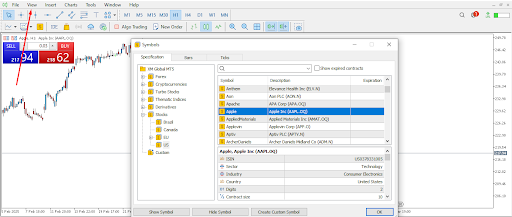
First, you must find the stock or index you want to trade. To do this, click the ‘View’ option, then search through the symbols to find the stock or index you want to trade. In this case, we have picked to trade the Apple stock. From here, you can click the ‘show symbol’ and find it on the market watch.
One-click trading
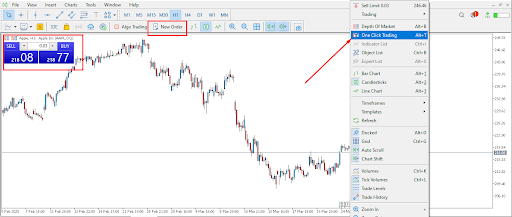
The MT5 platform has a unique feature called one-click trading that allows traders to place trades in one click. This means you can reduce delays encountered when confirming a trade before placing it.
To activate this feature, right-click on the charts and choose the option. After that, you can place your first trade by clicking on the ‘new order’ option or the quotes on the top left of your chart. This will direct you to a small window where you can fill in the details of your trade.
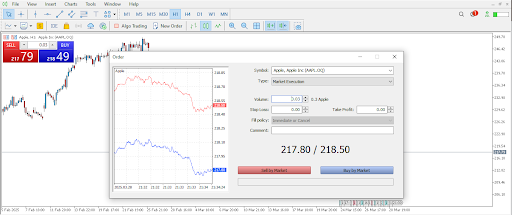
New order window
Here, the most important detail is the volume. Pick a lot size, then decide whether to add a stop loss and a take profit. If you are in a hurry, you can always add these two by right-clicking on the trade and choosing to modify. You can then place a trade by clicking on the red button to sell and the blue button to buy.
Additionally, you can choose between a market order and a pending order. A market order will be executed immediately at the current price. On the other hand, a pending order will be executed later, above or below the current price.
Tools for Managing Risk on MT5
The MT5 platform comes with built-in tools for managing risk and protecting your capital. These include the stop loss and trailing stop orders. You can add a stop-loss order when placing a trade. This is an order to cancel your position when the trade loses.
On the other hand, a trailing stop loss automatically adjusts a stop loss order to follow your trade as it wins. This ensures that you protect your profits against sudden reversals.
Conclusion
Trading stocks and indices on the MetaTrader platform has never been easier. Traders also have the added advantage of working with an award-winning platform that offers a wide range of technical and fundamental analysis tools.
Join Dominion Options today and start trading stocks and indices on MT5. Work with a top-rated, fully licensed broker and get access to one of the most popular trading platforms.