How to Open Your First Forex Trade on MT5: a Beginner’s Step-by-step Guide
Forex trading involves buying and selling currency pairs to profit from price fluctuations. To do this, traders pick a good broker like Dominion Options to connect them with the markets. Meanwhile, brokers charge trading costs like spreads to make a profit.
Moreover, brokers connect traders to the currency markets by providing trading platforms. These platforms allow you to interact with the markets through technical and fundamental analysis. They also allow you to enter, manage, and exit trades. This article will focus on the MetaTrader 5 platform and how to open your first forex trade
The MT5 Platform for Forex Trading
The MT5 is a multi-asset platform with advanced features and a wide range of analysis tools. Its simple design allows even beginners to navigate the workspace easily.
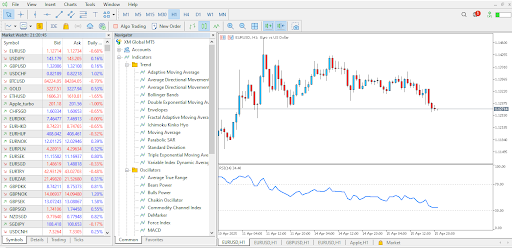
MT5 Platform
After setting up your account and depositing funds, you can download the MT5 platform from the Platforms section and install it on your computer.
Before MT5, MetaTrader only offered its clients the MT4 platform, which gained popularity rapidly. MT4 became one of the best platforms because of its simple design and unique trading tools. However, MT5 is a better platform as it is an improvement of MT4.
The MT4 platform mainly focuses on forex and CFDs. Meanwhile, the multi-asset MT5 platform allows traders to diversify their portfolios better. Unlike MT4, it offers forex, stocks, futures, commodities and indices.
Additionally, MT5 has more analysis tools than MT4. For instance, MT5 has 21 timeframes, while MT4 has only 9. Other unique tools include the Depth of Market, an economic calendar and a more powerful strategy tester. Furthermore, MT5 has more advanced order types like the buy stop limit and the sell stop limit.
How to Set Up Your Dominion Options MT5 Account
To start trading with the MT5 platform on Dominion Options, visit the website and choose an account that suits your trading needs. After deciding on one, click the Open Account button, which will redirect you to the registration page.
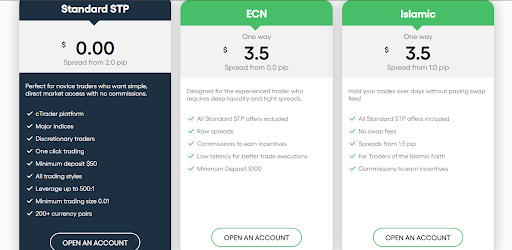
Dominion Options accounts
On the registration page, enter your account details and finish the process of becoming a Dominion Options trader.
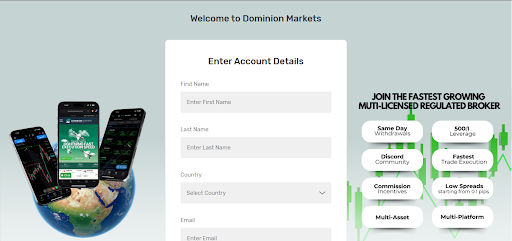
Dominion Options registration
Log in and deposit your initial capital after setting up an account and receiving the credentials. This will allow you to open trades. Afterwards, head to the platforms page and download MT5 for your PC. Finish by installing, setting it up and inputting the login credentials to start using the platform.
Navigating the MT5 Interface
Opening the MT5 platform will reveal a simple design with all the available trading tools.
Navigating MT5
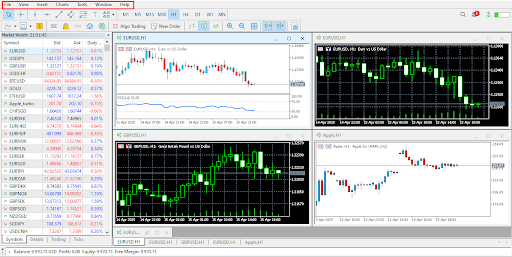
The first section at the top of the platform allows you to control most of what you see on the main windows and the entire platform. For instance, the File option will enable you to log into different accounts and open new ones. Meanwhile, the View option allows you to open new windows, like the navigator, which shows tools like indicators.
The Charts option focuses on changing items displayed on the charts. In the Tools section, you can access the strategy tester. Meanwhile, Windows allows you to arrange your charts in different styles. Finally, the Help section gives you guidance on using the platform.
Navigating MT5
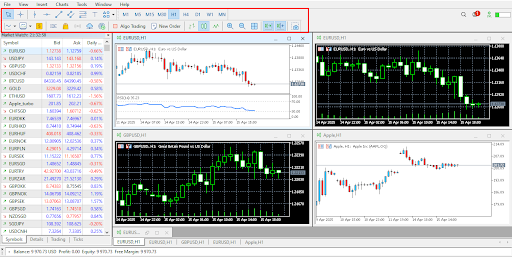
The second section gives you the most immediate trading tools. For instance, you can access graphical tools like trendlines and horizontal lines. Moreover, the section allows you to change timeframes on a chart. You can also pick chart types and place trades with the New Order option.
Navigating MT5
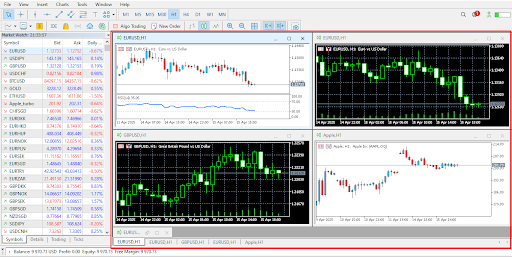
The next section shows the charts. Here, you can arrange any number of charts for analysis and simultaneously open up to 100 charts. From this section, you can right-click on any chart to customise it. This includes changing the colour schemes and adding or removing features like grid lines. You can also create and save templates with different indicators.
Navigating MT5
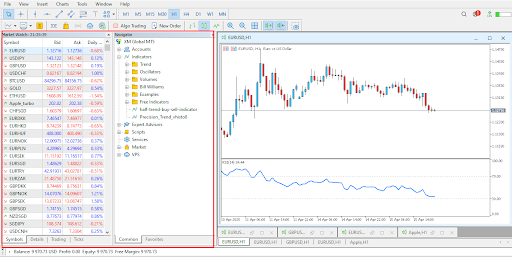
On the left side of the platform, you can open a window showing market data or one showing the navigator. The Market Watch gives you all the available trading instruments. You can right-click on any symbol to place an order or view the chart from here. Meanwhile, the Navigator window gives you access to your accounts, indicators, Expert Advisors and more.
Navigating MT5
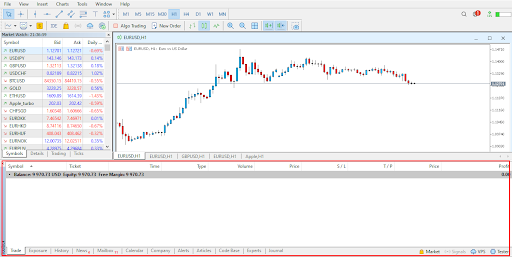
The last section gives you a window where you can monitor the progress of your open trades. Here, you can see the profit and loss. You can also close trades by clicking on the x. Other important windows in this section include the History, News and Calendar. History allows you to see all the trades you have opened and closed. Meanwhile, News and Calendar are great for fundamental analysis.
Opening Trades on MT5
Opening trades on MT5
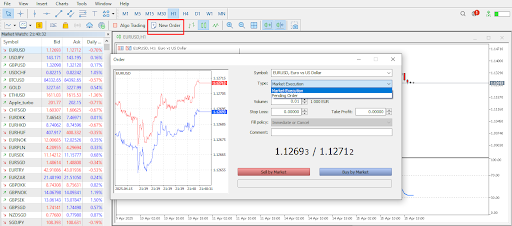
After learning your way around the MT5 platform, placing your first forex trade will be easy. Pick a pair you want to trade and open the chart. After doing your technical and fundamental analysis, press the New Order option. This will bring up a window to add details about your trade.
In this window, you can pick a market or a pending execution. The market execution will place your trade at the current price. Meanwhile, a pending execution will place an order above or below the current price.
Depending on your risk management, you must also decide on the volume or lot size of the position. Moreover, a stop loss price will ensure you exit the market when the price goes against you. Meanwhile, a take-profit price will close a winning position. After filling in all the necessary fields, click on Sell by Market or Buy by Market.
After entering a position, you can modify it by right-clicking on the order. You can also exit the position in the same way.
Growing as an MT5 Trader
Placing your first trade on MT5 is a significant milestone. However, you must also become a successful trader to grow. You can focus on building and gaining confidence in your strategy on a demo account to do this. Moreover, you can use educational resources on Dominion Options to improve your skills before trading real money.
Join Dominion Options today and place your first forex trade on the MT5 platform. Explore the user-friendly workspace and improve your skills as a trader.